Add a domain and set DNS
Add the DNS records we show, then recheck until the domain is verified
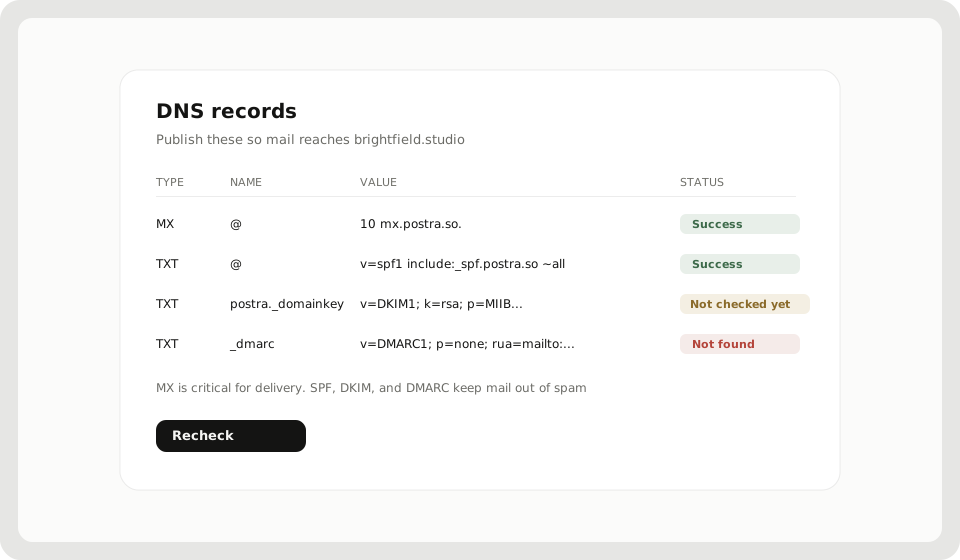
Mail only lands on your domain after DNS is right. Postra shows the exact records to add and how each one looks.
Add the domain
- Open Profile → Domains (or Getting started → Add a domain)
- Choose Add domain and enter a domain you control
- Follow Domain → DNS → Verifying → Mailbox
You need single sign-on linked first. See Get started on Postra.
What each record is for
| Record | Job |
|---|---|
| MX | Where other servers deliver mail for this domain. Critical |
| SPF | Which servers may send as this domain |
| DKIM | Public key that proves the message was signed here |
| DMARC | What receivers should do when SPF/DKIM do not line up |
Optional records like MTA-STS and TLS reporting show up when they apply to your setup. Finish MX first, then SPF, DKIM, and DMARC so your outbound mail is less likely to land in spam.
Add the records and recheck
- On the domain page, open DNS setup (or Details when we warn you)
- Copy name and value into your DNS host
- Wait for propagation. It can take minutes or a few hours
- Choose Recheck
Statuses you will see: Success, Not checked yet, or Not found. A yellow banner Delivery may be affected means authentication records are incomplete. Mail may still arrive with MX alone, but send reputation suffers without SPF/DKIM/DMARC.
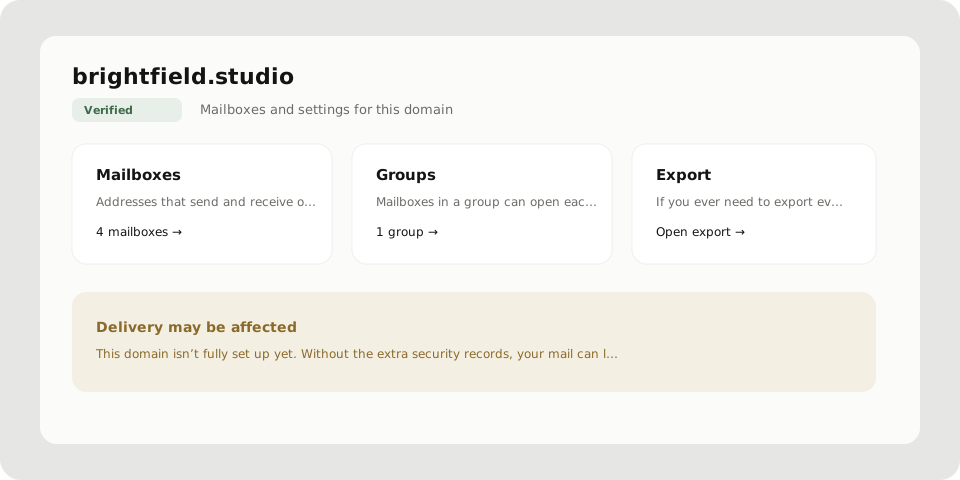
After verification
Create the first mailbox on that domain, then forwarding as needed. Next: Mailboxes and forwarding.