Folders and filters
Smart views for slicing the inbox, folders for filing mail.
Postra separates filters (smart views) from folders (places you put mail). Both live in the left sidebar.
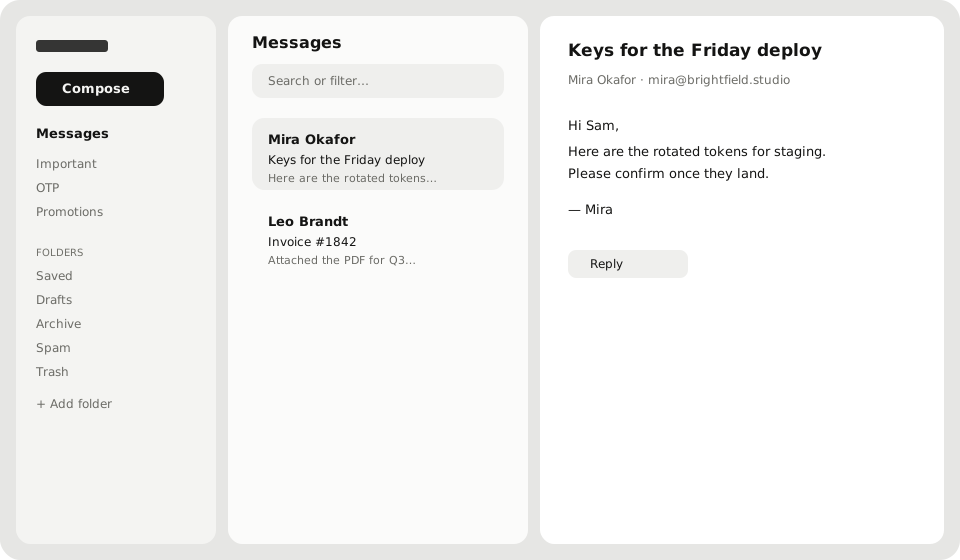
System filters
Under Messages you will see views like:
- Important
- OTP (one-time codes)
- Promotions
These are not folders. They surface matching mail while the originals stay where they are. Open Messages for the full list.
System folders
- Saved
- Drafts
- Archive
- Spam
- Trash
Drag conversations onto a folder, or use the message menu. You cannot drop mail into Drafts; drafts are only for unsent compose.
Your own folder
- Sidebar → Add folder
- Name it
- Postra opens the new folder
Move mail in with drag-and-drop or the message actions.
Your own filter
From the message list, create a New filter, give it a name, and use it as another smart view. Filters are for slicing the inbox; folders are for filing.
Everyday moves
| Goal | How |
|---|---|
| Clear the main list without deleting | Archive |
| Keep for later | Saved |
| Unwanted / phishing | Spam (confirm when asked) |
| Remove | Trash (confirm when asked) |
Blocking a sender is separate: see Spam, block, and sender warnings.